AlertDialog
Can be used to inform the user about situations that require acknowledgement.
It has an optional title and an optional list of actions . The
title is displayed above the content and the actions are displayed
below the content.
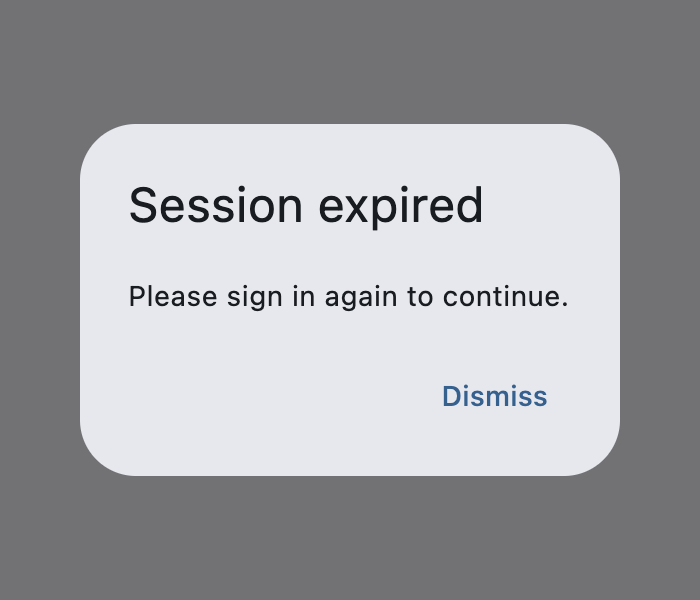
Example:
ft.AlertDialog(
    title=ft.Text("Session expired"),
    content=ft.Text("Please sign in again to continue."),
    actions=[ft.TextButton("Dismiss")],
    open=True,
)
Inherits: DialogControl
Properties
action_button_padding- The padding that surrounds each button inactions.actions- A set of actions that are displayed at the bottom of this dialog.actions_alignment- Defines the horizontal layout of the actions.actions_overflow_button_spacing- The spacing betweenactionswhen theOverflowBarswitches to a column layout because the actions don't fit horizontally.actions_padding- Padding around the set ofactionsat the bottom of this dialog.alignment- How to align this dialog.barrier_color- The color of the modal barrier below this dialog.bgcolor- The background color of this dialog's surface.clip_behavior- Defines how the contents of this dialog are clipped (or not) to the givenshape.content- The content of this dialog is displayed in the center of this dialog in a lighter font.content_padding- Padding around thecontent.content_text_style- The style for the text in thecontentof this dialog.elevation- Defines the elevation (z-coordinate) at which this dialog should appear.icon- A control that is displayed at the top of this dialog.icon_color- The color for the Icon in theiconof this dialog.icon_padding- Padding around theicon.inset_padding- Padding around this dialog itself.modal- Whether dialog can be dismissed/closed by clicking the area outside of it.scrollable- Determines whether thetitleandcontentcontrols are wrapped in a scrollable.semantics_label- The semantic label of this dialog used by accessibility frameworks to announce screen transitions when this dialog is opened and closed.shadow_color- The color used to paint a drop shadow under this dialog, which reflects this dialog'selevation.shape- The shape of this dialog.title- The title of this dialog is displayed in a large font at its top.title_padding- Padding around thetitle.title_text_style- The text style for thetitleof this dialog.
Examples
Modal and non-modal dialogs
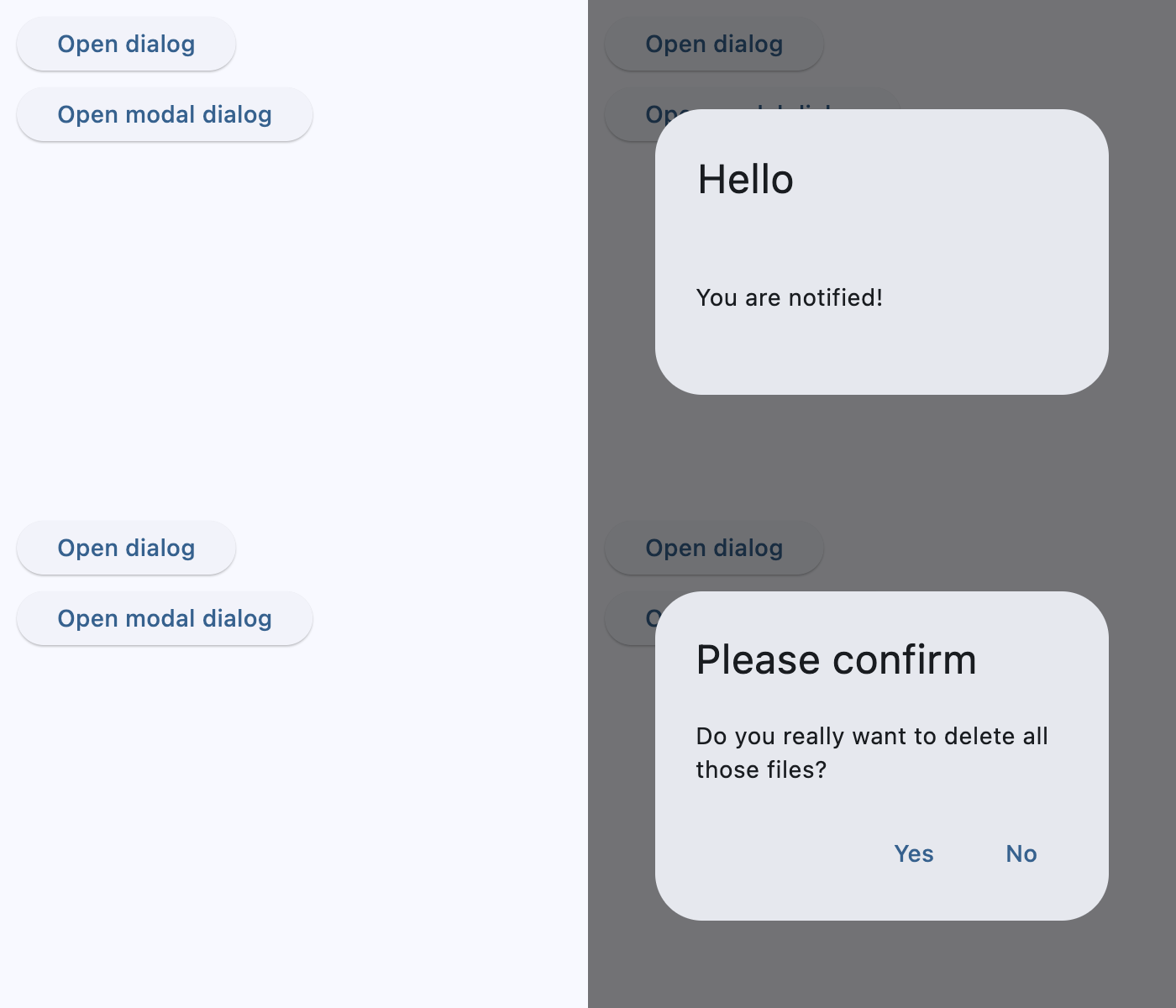
import flet as ft


def main(page: ft.Page):
    page.title = "AlertDialog examples"

    dialog = ft.AlertDialog(
        title=ft.Text("Hello"),
        content=ft.Text("You are notified!"),
        alignment=ft.Alignment.CENTER,
        on_dismiss=lambda e: print("Dialog dismissed!"),
        title_padding=ft.Padding.all(25),
    )

    modal_dialog = ft.AlertDialog(
        modal=True,
        title=ft.Text("Please confirm"),
        content=ft.Text("Do you really want to delete all those files?"),
        actions=[
            ft.TextButton("Yes", on_click=lambda e: page.pop_dialog()),
            ft.TextButton("No", on_click=lambda e: page.pop_dialog()),
        ],
        actions_alignment=ft.MainAxisAlignment.END,
        on_dismiss=lambda e: print("Modal dialog dismissed!"),
    )

    page.add(
        ft.SafeArea(
            content=ft.Column(
                controls=[
                    ft.Button(
                        content="Open dialog",
                        on_click=lambda e: page.show_dialog(dialog),
                    ),
                    ft.Button(
                        content="Open modal dialog",
                        on_click=lambda e: page.show_dialog(modal_dialog),
                    ),
                ]
            )
        )
    )


if __name__ == "__main__":
    ft.run(main)
Properties
action_button_paddingclass-attributeinstance-attribute
action_button_padding: PaddingValue | None = NoneThe padding that surrounds each button in actions.
actionsclass-attributeinstance-attribute
actions: list[Control] = field(default_factory=list)A set of actions that are displayed at the bottom of this dialog.
Typically this is a list of TextButton controls.
actions_alignmentclass-attributeinstance-attribute
actions_alignment: MainAxisAlignment | None = NoneDefines the horizontal layout of the actions.
Internally defaults to MainAxisAlignment.END.
actions_overflow_button_spacingclass-attributeinstance-attribute
actions_overflow_button_spacing: Number | None = NoneThe spacing between actions when the OverflowBar switches to a column layout because the actions don't fit horizontally.
If the controls in actions do not fit into a single row, they are arranged into a
column. This parameter provides additional vertical space between buttons when it
does overflow.
actions_paddingclass-attributeinstance-attribute
actions_padding: PaddingValue | None = NonePadding around the set of actions at the bottom of this dialog.
Typically used to provide padding to the button bar between the button bar and the edges of this dialog.
If are no actions, then no padding will be included. The padding around the button bar defaults to zero.
alignmentclass-attributeinstance-attribute
alignment: Alignment | None = NoneHow to align this dialog.
If None, then DialogTheme.alignment is used.
If that is also None, the default is Alignment.CENTER.
barrier_colorclass-attributeinstance-attribute
barrier_color: ColorValue | None = NoneThe color of the modal barrier below this dialog.
If None, then DialogTheme.barrier_color is used.
If that is also None, the default is Colors.BLACK_54.
bgcolorclass-attributeinstance-attribute
bgcolor: ColorValue | None = NoneThe background color of this dialog's surface.
clip_behaviorclass-attributeinstance-attribute
clip_behavior: ClipBehavior = ClipBehavior.NONEDefines how the contents of this dialog are clipped (or not) to the given shape.
contentclass-attributeinstance-attribute
content: Control | None = NoneThe content of this dialog is displayed in the center of this dialog in a lighter font.
Typically this is a Column
that contains this dialog's Text message.
content_paddingclass-attributeinstance-attribute
content_padding: PaddingValue | None = NonePadding around the content.
If there is no content, no padding will be provided. Otherwise, padding of 20
pixels is provided above the content to separate the content from
the title, and padding of 24 pixels is provided on the left, right,
and bottom to separate the content from the other edges of this dialog.
content_text_styleclass-attributeinstance-attribute
content_text_style: TextStyle | None = NoneThe style for the text in the content of this dialog.
If None, DialogTheme.content_text_style is used.
If that's is also None, defaults to
TextTheme.body_medium (if Theme.use_material3 is True;
TextTheme.title_medium otherwise) of
Theme.text_theme.
elevationclass-attributeinstance-attribute
elevation: Number | None = NoneDefines the elevation (z-coordinate) at which this dialog should appear.
iconclass-attributeinstance-attribute
icon: Control | None = NoneA control that is displayed at the top of this dialog.
Typically a Icon control.
icon_colorclass-attributeinstance-attribute
icon_color: ColorValue | None = NoneThe color for the Icon in the icon of this dialog.
If None, DialogTheme.icon_color is used.
If that is null, defaults to color scheme's ColorScheme.secondary if
Theme.use_material3 is True, Colors.BLACK otherwise.
icon_paddingclass-attributeinstance-attribute
icon_padding: PaddingValue | None = NonePadding around the icon.
inset_paddingclass-attributeinstance-attribute
inset_padding: PaddingValue | None = NonePadding around this dialog itself.
Defaults to Padding.symmetric(vertical=40, horizontal=24) - 40 pixels
horizontally and 24 pixels vertically outside of this dialog box.
modalclass-attributeinstance-attribute
modal: bool = FalseWhether dialog can be dismissed/closed by clicking the area outside of it.
scrollableclass-attributeinstance-attribute
scrollable: bool = FalseDetermines whether the title and content controls are wrapped in a scrollable.
This configuration is used when the title and content are expected to overflow.
Both title and content are wrapped in a scroll view, allowing all overflowed
content to be visible while still showing the button bar.
semantics_labelclass-attributeinstance-attribute
semantics_label: str | None = NoneThe semantic label of this dialog used by accessibility frameworks to announce screen transitions when this dialog is opened and closed.
On iOS, if this label is not provided, a semantic label will be inferred from the
title if it is not None.
shadow_colorclass-attributeinstance-attribute
shadow_color: ColorValue | None = NoneThe color used to paint a drop shadow under this dialog, which reflects this dialog's elevation.
shapeclass-attributeinstance-attribute
shape: OutlinedBorder | None = NoneThe shape of this dialog.
If None, defaults to DialogTheme.shape.
If it is also None, it defaults to RoundedRectangleBorder(radius=4.0).
titleclass-attributeinstance-attribute
title: StrOrControl | None = NoneThe title of this dialog is displayed in a large font at its top.
Typically a Text control.
title_paddingclass-attributeinstance-attribute
title_padding: PaddingValue | None = NonePadding around the title.
If there is no title, no padding will be provided. Otherwise, this padding is used.
Defaults to 24 pixels on the top, left, and right of the title.
If the content is not None, then no bottom padding
is provided (see content_padding).
If it is not set, then an extra 20 pixels of bottom padding is added to separate
the title from the actions.
title_text_styleclass-attributeinstance-attribute
title_text_style: TextStyle | None = NoneThe text style for the title of this dialog.
If None, DialogTheme.title_text_style is used.
If that is also None, the default comes from the active dialog theme.